Sometimes I have to put text on a path
Showing posts with label MathML. Show all posts

Sunday, June 3, 2012

How to import or export LaTeX equation into MS Word Equation or into MathType or with freewares?; special symbols; formula editors, plug-in; import/export with microsoft office (word, powerpoint)

Converters from or to LaTeX from or to Textprocessors or powepoint-like programs (MS office or other) - Overview

A formula editor is a name for a computer program that is used to typeset mathematical works or formulae in a web browser, stand alone, plug-in for microsoft office, or general plug-in (for example Mathtype
works with 400 applications and websites.
http://en.wikipedia.org/wiki/Formula_editor
Content for formula editors can be provided manually using a markup language, e.g. TeX or MathML, via a point-and-click GUI (mathtype), or as computer generated results from symbolic computations such as Mathematica.


Oldies: Microsoft Equation Editor 3.0 is a deprecated editor included in Microsoft Office products, based on limited version of MathType (US$57 academic).
Now: Microsoft Equation Editor  with MS office 2011
MAC: Equation Editor.app  v14.2.0 (august 2010) 4MB (Intel version)
also a limited version of MathType.
See below for how to use the full version of MathType which allows many import/export.


To illustrate these, let me restrict it to the Microsoft Word case:
  • directly type or paste LaTeX code into Word 
  • use a Word import filter 
  • use a Word macro: load LaTeX file as plain text, then search for LaTeX markup and replace the markup by formatting, special characters and equations. 
  • use an external converter:
  1. LaTeX -> RTF, then use Word's own RTF import,
  2. LaTeX -> HTML, then use Word's internet assistant or built-in html converter,
  3. maybe other external format(s).
The converters being most complete and currently maintained / supported are:
TeX2Word - a shareware LaTeX import filter for MS Word
GrindEQ - a shareware LaTeX import filter for MS Word
latex2rtf - a free standalone LaTeX -> RTF converter for PC, Macintosh and Unix,
TeX4ht - a free LaTeX to html or XML converter for PC and Unix produces html which is good for loading into Word. TeX4ht relies on other software, it needs at least a full TeX system.


Directly type or paste LaTeX code into Word

All of these only allow typing or pasting LaTeX coded equations in Word, not LaTeX coded text elements.
"Aurora" can now convert a LaTeX coded equation (which must be placed on the Windows clipboard) to Word. The converter is still experimental and as such has a number of limitations, some of which will be addressed in future releases. The converter’s output will generally need some manual touching up to achieve the level of fidelity on a par with the original document.
The other functionality of Aurora, which was the only functionality of its predecessor "Ribbit", is letting you enter LaTeX equations in word processors such as MS Word or in Powerpoint. One can enter the equation in LaTeX markup, and the formatted equation is inserted as an object.
See homepage (external link) (Shareware)
Aurora needs a working LaTeX installation. If there is no, it will install a micro version of MiKTeX.

"LaTeX in Word": See homepage (external link) (Freeware, GPL).
It allows to enter LaTeX equations in word processors such as MS Word in LaTeX markup, and the formatted equation is inserted in the Wordprocessor as a png bitmap. It needs a server which performs the conversion. Server installation files are available from the download page (external link).

MathType (external link) allows typing and pasting equations in LaTeX markup and also direct conversion of an equation in LaTeX markup which is part of the Word document text.
OpenOffice allows typing equations in LaTeX-like markup.
Word 2007 allows typing equations in LaTeX-like markup (although not 100% compatible), see http://blogs.msdn.com/microsoft_office_word/archive/2006/10/04/Equations-in-Word-2007.aspx


Typing equations from the keyboard:
  • Create and edit equations using only the keyboard and without leaving Word: MathType adds keyboard shortcuts to Word that allow you to insert a new equation, or edit an existing one, using just a keystroke.
  • Type equations in TeX directly into Word: You can type TeX directly into Word. When you are done, type Alt+\ (Toggle TeX) to convert it to a MathType equation. Later, if you want to edit the equation's TeX code, just type Alt+\ again. The Toggle TeX command allows you to switch between TeX and MathType views of the equation.


MathType is a powerful interactive equation editor for Windows and Macintosh that lets you create mathematical notation for word processing, web pages, desktop publishing, presentations, elearning, and for TeX, LaTeX, and MathML documents.
MathType works with any wordprocessor, presentation program, page layout program, HTML-authoring tool and other types of software, to create perfectly formatted maths for class materials, research papers, web pages, slide presentations, journal articles and books.
Version 6.8 is loaded with features to help you do more, save time and create better-looking documents and web sites.
New features include:
MathType support for 64-bit Microsoft Office
Compatibility with 40 new apps (600+ and counting...)
Paste tables from spreadsheets, documents, web pages, etc. into MathType as a matrix (frequent user request)
MathPage support for Microsoft Word 2010 and 2007, converts documents into web pages, properly handling mathematical symbols.
Authoring for Accessibility: As part of our work in the accessibility community, we've made MathType useful for people with various disabilities, such as blindness, low vision, and learning disabilities.
Download Free Trial of MathType 6.8 for Windows. or MathType 6.7 for Mac.

Works with:

Microsoft Office, Apple iWork '09, Adobe InDesign, iBooks Author, Mathematica, Maple, GMail,OpenOffice, Blackboard, Moodle...


More Ways to Create Equations
Entering Maths by Hand: Entering equations as easily as you would write maths with paper and pencil! This feature uses the built-in handwriting recognition in Windows 7 or later.
Point-and-Click Editing with Automatic Formatting: Create equations quickly by choosing templates from MathType's palettes and typing into their empty slots. MathType applies mathematical spacing rules automatically as you type.
Keyboard Shortcuts: Save time using keyboard shortcuts. MathType has customisable keyboard shortcuts for virtually every symbol, template, and command.
Type TeX or LaTeX: If you already know the TeX typesetting language, you can enter equations directly into MathType or Microsoft Word documents. TeX editing can be mixed with point-and-click editing so you get the best of both worlds. You can even paste in equations from existing TeX documents.
http://www.dessci.com/en/products/mathtype/features.htm#mathml_import
Copy-and-Paste: If you created your equation in another application or found one on a website, why take the time to create it by hand again? Simply Copy-and-Paste it directly into MathType, and it is ready to edit or use in your work.
Save Expressions in the Toolbar: Drag frequently used equations and expressions to the MathType toolbar so they can be inserted later with just a click or a keystroke.
Supports Microsoft Office 2010 (both 32- and 64-bit), 2007, 2003, and XP (2002)
Microsoft Office 2007 & 2010 — MathType Ribbon Tab in Word and PowerPoint: MathType takes full advantage of Office's Ribbon User Interface making it easier than ever to do equation operations in documents and presentations. New equation numbering and browse features work with all Word equation types.
Microsoft Office 2003, XP (2002) — MathType Toolbar and Menu in Word and PowerPoint: MathType adds a toolbar and menu to Microsoft Word and PowerPoint, allowing quick access to its features and powerful commands to do equation numbering, produce great-looking maths web pages, presentations, and much more.
Find Symbols: MathType's Insert Symbol dialog allows you to explore the available symbols and insert them with a click or keystroke. 
More Control:
Colour: Use colour to highlight part of an equation and focus your audience's attention on just the portions you want. Show what changed in each step of a multi-step procedure and make those equations really come to life.
More Fonts: MathType has hundreds more symbols and templates than Equation Editor. Besides our exclusive Euclid™ maths fonts, you can also make use of the 1000s of maths symbols in fonts already on your computer, as well as other maths fonts you can download from the Internet.
System Requirements:
Windows: Microsoft Windows 7, Windows Vista, or Windows XP.
12 MB free hard disk space. MathType is not RAM-intensive so listing its requirements is not necessary.
Macintosh: Mac OS X 10.3.9 or newer. 20 MB free hard disk space.


If you are using OS X, one of my preferred solution is LaTeXiT, which creates a picture of the equation that you can drag into Word or elsewhere. A potential Windows analog that I have not tested is Laeqed.

Some solutions for MS powerpoint:

TeXPPT is a lightweight add-in for Microsoft PowerPoint that lets you input LaTeX source code directly in your presentations.
Rendered LaTeX code becomes true PowerPoint shapes (i.e. vector graphics) which can be manipulated as such: you can resize, colorize, drop shadows and even animate them without loosing quality! Furthermore, TeXPPT does not have to be installed in order to view a PowerPoint presentation containing LaTeX objects.
TeXPPT requires a working installation of MiKTeX, Ghostscript and pstoedit.If you don't want to mess with the PATH environment variable, you should install the 32-bit version of Ghostscript otherwise pstoedit won't find it automatically. It works with PowerPoint 2007 or 2010. You might need to install the .NET Framework 4 manually. If the installer complains about security issues, the signing certificate is available here. Simply double click to install the certificate.

MyTeXPoint (absolutely Free)
Free simplified version of TeXPoint. Partly compatible with the original TeXPoint.
It has integrated screenshot tool to copy equations and pictures right from the screen.
Supports microsoft powerpoint (tested with version 2007 and 2005). Compatible with Microsoft Office 2010.
MyTexPoint est une version simplifiee et gratuite de TexPoint. Cette version est partiellement compatible avec TexPoint MyTexPoint donne la possibilite de creer des formules mathematiques en utilisant Latex, et de les inserer dans des presentations. MyTexPoint possede differents outils de Latex et est, pour l'instant, seulement compatible avec Microsoft Powerpoint. 
How to use MyTexPoint
1) Open you presentation.
2) When powerpoint is open run mytexpoint.
3) Click on the "new equation" button (the last one). A new equation will appear. You can edit its LaTeX code in the mytexpoint window.
4) To copy an equation or picture right from the screen use the first button.
5) To delete white background from an arbitrary picture in your power point presentation select it in the power point and doubleclick on the mytexpoint window.

Shortcuts:
CompileShift+Enter or Ctrl+Shift+L
New equationCtrl+N
Jump between equationsCtrl+PgUp and Ctrl+PgDown
Move equationsCtrl+arrows
Resize equationsCtrl+Shift+arrows
Move equations a bitAlt+arrows
Resize equations a bitAlt+Shift+arrows

 Make sure that you have MiKTex and ghostscript installed
Vector picture formats (requeres pstoedit)

IguanaTex: a Free LaTeX Add-In for PowerPoint
IguanaTex is a PowerPoint plug-in which allows you to insert LaTeX equations into your PowerPoint presentation.
Select New Latex Equation from the Insert menu, and you will get a dialog box where you can type your equation. Type any valid LaTeX code, and click on Create. IguanaTex will compile your code into LaTeX, create an image from it and insert it into PowerPoint.
Need to change something in the equation? Just double-click on the image, and the IguanaTex dialog will re-appear so you can edit the LaTeX code; or, select the image and choose Edit Latex Equation from the Insert menu.
You can also treat the equation as an ordinary PowerPoint image. For example, it can be animated, rotated, moved, and resized.
When you save the presentation, both the image and the LaTeX code are stored. This means that you can display your presentation on any computer, even computers on which IguanaTex is not installed (no more missing fonts!). Of course, equations can only be edited if you install IguanaTex.

System Requirements
Windows 2000 or later, also support 64-bit versions of Windows.
PowerPoint: IguanaTex has been tested with PowerPoint 2000, 2003, 2007, and 2010.
LaTeX (can be downloaded from here: http://miktex.org/)

"not free" solutions:

30 US$
Full integration with Powerpoint and Word, in several languages
Authors:
George Necula (University of California, Berkeley)
Andreas Glatz (Argonne National Laboratory).
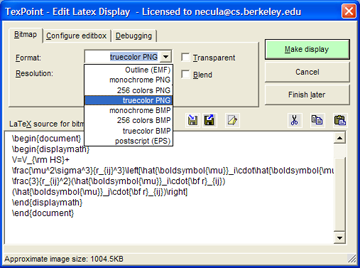
Using EMF Displays (Windows only)
Starting in version 2.0 of TexPoint you can create displays that are not bitmaps but outline graphics format (like PDF or Postscript). The actual graphics format is called EMF (Extended Metafile). To create such a display you must make sure to have installed the "Outline displays" feature of TexPoint (available and installed unless prohibited by you, starting with version 2.0). If you have this feature installed then you will see the EMF option in the "Bitmap format" combo box when you create or edit a display
TexPoint uses the PSTOEDIT program to translate the Postscript files generated by Latex into EMF. The program pstoedit.exe is installed in the TexPoint directory.  (To see the generated EMF file you can check the "Debugging/Keep Files" box and then look into the directory that contains the presentation. You will see that these files are much smaller than the bitmap files for the same display.)
The way EMF files work is that instead of containing a bitmap rendering of the characters that make up your display they contain references to characters in True Type (.ttf) versions of the Latex fonts. The catch is that for the displays to show correctly those fonts must be installed in your system. Make sure you read how TexPoint deals with these fonts to ensure that your presentation is viewable on machines without TexPoint.
The pstoedit tool will fail to create the EMF file if it contains fonts that are not installed in the system. In that case you will see a dialog box listing the fonts that are missing. TexPoint gives you the option to let pstoedit to substitute missing fonts. Just click the "Allow font substitution" checkbox. Please let us know if this is failing for standard Tex fonts.
EMF displays are transparent by default and cannot be made otherwise.

Office 2000 users: PowerPoint 2000 "forgets" to close EMF files that it loads. This prevents TexPoint from deleting the EMF files and requires it to create new EMF files with new names. The new names are formed using the value you have in the Debugging pane (default is txp_fig) along with a random numeric suffix. It is Ok to delete these files manually after you exit PowerPoint. Their contents is already included in the presentation.


Mathtype

Equations Everywhere and Anywhere™
Work with math in over 400 applications and websites!

Install MathType 6.7 and MathType commands for Microsoft Office: the installer will automatically search  for Office installations. I tested in may 2012: it works with Microsoft office 2011 (Mac OSX 10.5.x--10.7).


Generate good-looking, accessible math web pages:
MathPage: MathType includes our MathPage™ technology that easily converts Microsoft Word documents into web pages, properly handling mathematical symbols as well as MathType and Equation Editor equations.
MathML or GIF: MathPage can generate equations as either GIF images or MathML. MathML will allow you to copy and paste math into many applications that understand MathML.
Exact Speech command: Overrides the automatically generated speech used by MathPlayer's math-to-speech or braille conversion for a selected expression or symbol. This is important in a number of situations, such as in an assessment situation where the normal speech text from screen readers or other accessible technology (AT) might give away the answer.
Math accessibility: MathML is the key to math accessibility, allowing equations in web pages to be spoken by screen readers that are used by the blind and others.

some screenshots of the files:


--------many import/export and many preferences:

the 5nd button: toggle between latex or rendering


---------
ex-ample: latex->toggle button->rendering 


---------------------------------------
http://superuser.com/questions/202806/how-to-import-latex-equation-into-ms-word-equation-or-into-mathtype


----------in french:
comment écrire un code algorithmique avec des équations dans des boites en utilisant word comme éditeur de text?


Je suis entrain d'écrire un article j'ai trouvée un problème avec latex, donc j'ai décidée d'utiliser word 2011. Le problème est que j'ai des codes algorithmiques que je vais l'introduire dans mon article, alors comment écrire un code algo en utilisant word comme éditeur de texte.


Wednesday, January 25, 2012

A post (only in french) for tex-latex or xetex and é à ï î ç...; un post en français pour les caractères avec accents

This post is in french because it's focused on the use of french special characters with tex-latex ou xetex.
------intro:
Les caractères accentués et liés (é, à, æ, Å, ø…) n'existent pas en langue anglaise. De fait, le standard informatique ASCII « de base » ne définit que 127 caractères non accentués, dits « caractères ASCII 7 bits ». La norme ASCII définit des caractères étendus, dits « caractères 8 bits », pour chaque pays, ce qui permet d'avoir les caractères éccentués et liés directement sur le clavier. Unicode augmente encore ces aspects. Mais hélas Tex et Latex sont apparus avant unicode... Tout document texte LaTeX peut donc être écrit en ASCII 7bits, ce qui garantit la plus forte interopérabilité.
On va donc limiter ce post à Tex-Latex.


XeTeX (http://fr.wikipedia.org/wiki/XeTeX) est un logiciel de mise en page dérivé de TeX qui utilise l'Unicode et les technologies modernes de polices de caractères telles que OpenType. Initialement développé pour Mac OS X, il est maintenant multiplate-forme. Les fichiers sources sont, par défaut, en utf-8. XeTeX fonctionne avec LaTeX et ConTeXt (macro packages). Sa partie LaTeX est xelatex. Il est utilisé avec le package fontspec, qui permet une interface configurable pour le choix des fonts et permet un choix très vaste de fonts.
XeTeX est incorporé dans les distributions TeX Live 2010, MacTeX 2010 et MiKTeX 2.8.
Unicode et la norme ISO/CEI 10646 attribuent à chaque caractère un nom officiel au sein d’un répertoire commun unifié entre toutes les langues et tous les usages. Dès que le répertoire commun est approuvé, les caractères sont groupés en blocs en fonction de leur usage et des écritures supportées, et reçoivent une identification numérique unique appelée point de code, identifiée généralement sous la forme U+xxxx (où xxxx est un nombre hexadécimal de 4 à 6 chiffres, entre U+0000 et U+10FFFF). La plage définie permet d'attribuer jusqu'à 1 114 112 points de code.

Il y a aussi MathML voir sur ce blog la catégorie "mathML".

 ------généralités LaTeX
Les commandes commencent par une contre-oblique \ suivie de 2 possibilités:
  • un nom composé uniquement de lettres non diacritiés.
    Une espace (en typographie, le mot « espace » est féminin…), un chiffre ou tout autre caractère clôture le nom,
    ex : x\mapsto2 x\mapsto2 ;
  • un seul caractère spécial (non-lettre), ex : \# \#
Remarque: depuis janvier 2003, les formules mathématiques sur Wikipédia peuvent être écrites avec latex: http://fr.wikipedia.org/wiki/Aide:Formules_TeX
où les formules s'écrivent entre … .

------les caractères spéciaux (ascii non 7bits)
Les caractères suivant sont utilisés par LaTeX pour la compilation (ils ont une signification particulière pour la mise en forme du texte) et ne peuvent donc figurer tels quels dans le texte :
$ & % # { } _ \ ^ ~
Il faut les remplacer par d'autres. Il suffit de faire figurer une barre de fraction inversée « \ » devant,
\$ \& \% \# \{ \}
sauf pour les 3  caractères suivant (heureusement,  ils sont assez rarement utilisés en tant que tels):
« \ » qui s'écrit \ textbackslash,
« ~ » " \ textasciitilde,
« ^ » " \ textasciicircum.


Si l'on reste toujours sous le même environnement (même type d'ordinateur, même système d'exploitation, même pays), alors on peut utiliser les caractères accentués du clavier, quitte à utiliser l'extension inputenc en mettant :
\usepackage[latin1]{inputenc}
dans l'en-tête du fichier.
ou par exemple  \usepackage[frenchb]{babel} 
ou \usepackage[french]{babel}
Les deux sont absolument identiques mais frenchb indique clairement que l'on veut utiliser le français avec babel d'où le b. L'extension babel facilite l'adaptation de la typographie du document à sa langue comme calc permet d'accomplir des calculs simples. La liste des extensions est interminable ; heureusement, tous les paquetages sont réunis au sein du Comprehensive TeX Archive Network (CTAN).

Mais dans le cas général, si le texte doit être lu dans un autre environnement ou par quelqu'un d'un autre pays, il faut utiliser la frappe suivante avec les "commandes".
Pour mettre un accent aigü, il suffit de faire précéder la lettre de « \' », « \` » pour un accent grave, « \^ » pour un accent circonflexe, et « \" » pour un tréma. De manière générale, on a « \ + accent + lettre ».
Exemple :

é\'e
É\'E
è\`e
à\`a
È\`E
À\`A
ê\^e
â\^a
î\^\i 
ô\^o
û\^u
Ê\^E
Â\^A
Î\^I
Ô\^O
Û\^U
ë\"e


ï\"\i 


ü\"u
Ë\"E


Ï\"I


Ü\"U
NB : pour le « i » accentué, la barre de fraction entre l'accent et le i sert à enlever le point ; il est important de laisser un espace après le i, car certaines instruction commencent elles aussi par \i, comme \it (texte en italique) par exemple (cet espace sera ignoré lors de la compilation). Exemple :
ab\^\i me
pour écrire « abîme » Ajoutons la cédille, le « e dans l'a/o » et le symbole angström (unité de mesure des distances atomiques en physique) :

ç \c c
Ç \c C
æ \ae
Æ \AE
œ \oe
Œ \OE
Å \AA
NB : pour la cédille, il est important de laisser un espace après le \c, car certaines instructions commencent elles aussi par \c, comme \chapter (marque le début d'un chapitre) par exemple (cet espace sera ignoré lors de la compilation). Exemple :
fa\c cade
pour écrire « façade » Voici quelques signes de ponctuation particuliers :
  • petit tiret - (signe moins) : « - » ;
  • tiret moyen – (de la largeur d'un « N ») pour les intervalles de nombres : « -- » ;
  • tiret long — (de la largeur d'un « M ») pour les incides (alternative aux parenthèses) : « --- » ;
  • guillemets français « et » : « << » et « >> » (deux signes inférieur et deux signes supérieur).
On peut aussi représenter les accent et caractères espagnols (tilde, points d'interrogation et d'exclamation inversés), norvégiens… Pour connaître les codes à taper, il faut chercher...
Enfin, il existe des caractères spéciaux pour la mise en page :
  • l'espace insécable « ~ », qui n'est pas coupée par un changement de ligne et en français précède notamment les « : ; ! ? » (ces signes sont également suivis d'une espace normale) et se trouve à l'intérieur des guillemets et des tirets d'incise (qui sont eux-même encadrés par des espaces normales) ;
    en typographie française, on écrit …~;, …~!, …~?, <<~…~>> et ---~…~--- ;
  • l'espace forcée « {} » (accolade d'ouverture-accolade de fermeture) ou bien « \  » (barre de fraction inversée-espace), qui est sécable ;
  • et l'espace fine « \, ».

Notes
  • 1 - ASCII : american standard code for instruction interchange retour
  • 2 - un caractère est une lettre, un chiffre, mais aussi un signe de ponctuation, une espace… retour
 Ref: http://deuns.chez.com/latex/carac.html

Wednesday, July 27, 2011

example: LaTeX Drawings; MathML

\( \TeX \)

An example with picture (text and equation): see the code at the end of this post.
Mathjax, http://www.codecogs.com/,  google equation editor ("too long"), don't work with this code.


http://latexdraw.sourceforge.net/
LaTeXDraw is a graphical drawing editor for LaTeX. LaTeXDraw can be used to 1) generate PSTricks code; 2) directly create PDF or PS pictures. LaTeXDraw is developped in Java and thus runs on top of Linux, Windows, and Mac OS X.

With LaTeXit (it could export to SVG with pdf2SVG, or MathML...):


----------LaTeX code:

\setlength{\unitlength}{0.8cm}


\begin{picture}(6,5)


\thicklines
\put(1,0.5){\line(2,1){3}}
\put(4,2){\line(-2,1){2}}
\put(2,3){\line(-2,-5){1}}
\put(0.7,0.3){$A$}
\put(4.05,1.9){$B$}
\put(1.7,2.95){$C$}
\put(3.1,2.5){$a$}
\put(1.3,1.7){$b$}
\put(2.5,1.05){$c$}
\put(3.5,0.4){$\displaystyle
s:=\frac{a+b+c}{2}$}


\end{picture}

Wednesday, July 20, 2011

BEST "ex-ample": NIST Digital Library of Mathematical Functions; Abramowitz and Stegun’s (1964) Handbook of Mathematical Functions with Formulas, Graphs, and Mathematical Tables;a LaTeX to XML/mathML Converter

For 50 years, a standard reference in mathematical work has been Abramowitz and Stegun’s (1964) Handbook of Mathematical Functions with Formulas, Graphs, and Mathematical Tables. It has provided a marvellous collection of results and tables that have been indispensable for a generation of mathematicians.
Now it has been reissued as the NIST Handbook of Mathematical Functions (Cambridge University Press) with a free web edition called the NIST Digital Library of Mathematical Functions. It has been updated to include lots of new topics.
http://dlmf.nist.gov/
The equation is an image with latex code between alt-tags (automatic mode)
You can change this (http://dlmf.nist.gov/help/customize):
  • Automatic
  • XHTML+MathML
  • HTML+images

You can also select the Visualization Format:
  • VRML
  • X3D

--------------------
See also:
A LaTeX to XML Converter:
http://dlmf.nist.gov/LaTeXML/

Tuesday, July 19, 2011

How to post mathematics in wikipedia or in MediaWiki? the MediaWiki API and extensions


How to write mathematics in blog/sites (not wiki)?
See this post:
http://ex-ample.blogspot.com/2011/07/mathml-chromefirefox-and-best.html

An ex-ample : the online  NIST Digital Library of Mathematical Functions {Abramowitz and Stegun’s (1964) Handbook of Mathematical Functions with Formulas, Graphs, and Mathematical Tables}.
http://ex-ample.blogspot.com/2011/07/best-ex-ample-nist-digital-library-of.html

The first steps for writing/test your equation/formula in wikipedia:
------------
The operation of Wikipedia depends on MediaWiki, a custom-made, free and open source wiki software platform written in PHP and built upon the MySQL database. If you want to compare wiki: http://www.wikimatrix.org/
http://en.wikipedia.org/wiki/Comparison_of_wiki_software
------------

MediaWiki has 3 interfaces (http://www.mediawiki.org/wiki/API):
  • the MediaWiki API, which provides convenient access to wiki features, data and meta-data. 
  • the Special:Export page, which provides bulk export of wiki content as XML. Read the Export help article on meta.mediawiki.org for more information.
  • the standard web-based interface.
Extensions:
---version of mediaWiki used by wikipedia:
http://en.wikipedia.org/wiki/Special:Version#Installed_extensions

---inserting unusual characters:
http://www.mediawiki.org/wiki/Extension:CharInsert allows creation of JavaScript box for inserting unusual characters.
or copy/paste from: http://en.wikipedia.org/wiki/MediaWiki:Edittools

---mathematics, formula, equations:
Mediawiki des not have an integrated equation editor.
It only has a LaTeX rendering: you have to write or copy/paste a latex code  between HTML math-tags.
Then it's painful if you want to write pages on Math with a LARGE number of math equations (and symbols, graphs...), easily.


Mediawiki and MathML and LaTeX:
http://www.gossamer-threads.com/lists/wiki/mediawiki/234528

http://en.wikipedia.org/wiki/Help:Displaying_a_formula

http://en.wikipedia.org/wiki/Wikipedia:Manual_of_Style_(mathematics)#Typesetting_of_mathematical_formulae

MediaWiki uses a subset of (\AmS-\LaTeX) AMS-LaTeX markup
(http://en.wikipedia.org/wiki/AMS-LaTeX; http://www.ams.org/publications/authors/tex/amslatex),
a superset of LaTeX markup which is in turn a superset of TeX markup.
It generates either PNG images or simple HTML markup, depending on user preferences (see below).

Technical notes on AMS-LaTeX:
ftp://ftp.ams.org/pub/tex/amslatex/math/technote.pdf

http://en.wikipedia.org/wiki/Texvc
The program texvc (TeX validator and converter) validates AMS-LaTeX mathematical expressions and converts them to HTML, (limited MathML), or PNG graphics.

MediaWiki uses texvc to render mathematical formulas and similar content. The aim is to allow a single syntax for math markup while allowing a range of output formats to be generated, and to provide protection against cross-site scripting and other potential security issues. In addition, texvc provides some extensions to standard AMSLaTeX, such as \codes for HTML math character entities (for example, Σ → \Sigma) which have different names in LaTeX.

The HTML-code generated by texvc is based on 3 classes.
  • Conservative: the code should look good and work well in most browsers.
  • Moderate: the code should work and look good in reasonably modern browsers.
  • Liberal: the code is HTML, but it is designed for very recent browsers, such as newer versions of Mozilla. While it should be legible, it might not look very good.

There is also limited support for exporting to MathML.
Texvc is written in OCaml, along with PHP code to integrate it with the rest of MediaWiki.
It uses dvipng (instead of the commonly used combination of ImageMagick and dvips) to convert LaTeX's output to PNG files.
Like the rest of MediaWiki, it is available under the terms of the GNU GPL from the MediaWiki site.
Texvc cannot render arbitrary Unicode characters.

http://svn.wikimedia.org/viewvc/mediawiki/trunk/extensions/Math/math/README?view=markup


Rendering of this solution and the alt text (http://en.wikipedia.org/wiki/Wikipedia:ALT)
  • The PNG images are black on white (not transparent).
  • The alt text of the PNG images, which is displayed to visually impaired and other readers who cannot see the images, and is also used when the text is selected and copied.

Blahtex

The choice of wikipedia-mediawiki is clear: Latex AND conversion to MathML.
TeX is more display-oriented and MathML is more semantics-oriented, then we need both.
In the future, mediawiki will be able to generate enhanced HTML and MathML in many cases.
See blahtex for information about current work on adding MathML support:
http://www.mediawiki.org/wiki/Blahtex
Blahtex is a TeX-to-MathML converter intended for use with MediaWiki. It also outputs PNG graphics, much as the current TeX implementation on Wikipedia does.
http://www.mediawiki.org/wiki/Extension:Blahtex/Embedding_Blahtex_in_MediaWiki

http://gva.noekeon.org/blahtexml/
http://gva.noekeon.org/blahtexml/blahtexml-0.9-doc.pdf
http://developer.berlios.de/projects/blahtex/


Suggested structure of a mathematics article in wikipedia:
http://en.wikipedia.org/wiki/Wikipedia:Manual_of_Style_(mathematics)#Typesetting_of_mathematical_formulae

for Proofs
Wikipedia is an encyclopedia, not a collection of mathematical texts; but we often want to include proofs:
http://en.wikipedia.org/wiki/Wikipedia:WikiProject_Mathematics/Proofs

for Algorithms
There are no universally accepted standards for presenting algorithms on Wikipedia.
Source code should always use syntax highlighting.
http://en.wikipedia.org/wiki/Wikipedia:WikiProject_Computer_science/Manual_of_style_(computer_science)#Algorithms

--------------Preferences for Latex rendering:
Go to My Preferences
1) the submenu "appearance"
http://en.wikipedia.org/wiki/Special:Preferences#preftab-1
You have 6 choices:


2) the submenu "gadgets"
ProveIt is a user script that makes it really easy to find, edit, add, and cite references in Wikipedia articles. http://en.wikipedia.org/wiki/User:ProveIt_GT
http://en.wikipedia.org/wiki/User:Gadget850/Citation_templates
it uses several javascript libs (jQuery UI, loaded via Google Libraries API.)

WikEd is a full-featured Wikipedia-integrated advanced text editor.
http://en.wikipedia.org/wiki/User:Cacycle/wikEd
Pasting, import, and wiki code conversion of formatted text, e.g. from Microsoft-Word and web pages
Check the wikEd help page for a description of all buttons: http://en.wikipedia.org/wiki/User:Cacycle/wikEd_help

No equation editor or chemical formulae editor!!!
It only offers some useful tools:
http://en.wikipedia.org/wiki/User:Cacycle/wikEd_help#Missing_features_and_other_shortcomings
Fix buttons:

  • Fixes some common math issues outside of the math wikitag
  • Fixes unformatted chemical formulas. Super- and subscripts indices, uppercases elements, and fixes reaction arrows. 
  • Correct a large number of physical units. 
DejaVu fonts

Multimedia
Several new software features have been developed to improve the handling of multimedia in Wikipedia in collaboration with Kaltura (http://corp.kaltura.com/):
  • Easy searching and adding of media files to Wikipedia articles
  • Simplified uploading of videos and other media files to Wikimedia Commons
  • A new video player that is capable of displaying and adding subtitles
  • A sequence editor to create a mash up presentation of images and sound
--------------New user information (Guidelines, help, resources):
http://en.wikipedia.org/wiki/Wikipedia:Community_portal

--------------Tools
http://en.wikipedia.org/wiki/Wikipedia:Tools

LaTeX to Wikicode is a web-based translator.
LaTeX2wiki converts sections, math, and references using a web form:
http://en.wikipedia.org/wiki/User:Jmath666/latex2wiki

Wikipedia supports syntax highlighting. For information on how to use it, and the languages supported, see Syntax Highlight Extension: http://www.mediawiki.org/wiki/Extension:SyntaxHighlight_GeSHi

http://en.wikipedia.org/wiki/Wikipedia:Text_editor_support
Text on Wikipedia is encoded using the UTF-8 character set, which allows the use of many non-English characters and special symbols.
  • Many external editors
  • In-browser editors: wikEd

http://en.wikipedia.org/wiki/Wikipedia:Tools/Browser_tools/Mozilla_Firefox:

--------------music symbols and TeX:
http://meta.wikimedia.org/wiki/Music_markup

Monday, July 18, 2011

A small WYSIWYG (HTML+MathML+SVG) editor; standalone or a Firefox Addon


A small WYSIWYG (HTML+MathML+SVG) editor using XUL framework that works either as a standalone or as a Firefox Addon


Download MuLTiFlow software for free at SourceForge.net

paper:
"Simple ID/HREF-based microformat for non-local intra-document links for rendering graphical abstracts"
http://multiflow.sourceforge.net/twinkl.html


MuLTiFlow is a simple replacement for many word-processors with in-built maths and graphics capabilities that are bloat-wares built on archaic frameworks. However, unlike traditional word-processors MuLTiFlow has XML-nesting capabilities also, so it can also be used as a WYSIWYG XML editor.
The XUL framework also allows it to used both as a browser as well as an editor giving it even more capabiltities than a traditional word-processors, e.g., multimedia and interactions with the web.

Saturday, July 9, 2011

MathML3 sample


------------------sample 1

image of MathML rendering (Firefox 5 with STIX Fonts):
image of MathML rendering (chrome 14 with STIX fonts and MathJax; this blog):
See the quality of the rendering with your browser (and MathJax used by this "ex-ample blog rendering"):
(please install the "perfect" STIX fonts http://sourceforge.net/projects/stixfonts/)
c = a ⏟ real + b ⁢ ⅈ ⏟ imaginary ⏞ complex number

------------------sample 2

image of MathML rendering (Firefox 5 with STIX Fonts):
image of MathML rendering (chrome 14 with STIX fonts and MathJax; this blog):
See the quality of the rendering with your browser (and MathJax used by this "ex-ample blog rendering"):
Logic: ¬p∧q⟺¬p∨¬q
Boolean algebra: ⋃i=1nAi‾=⋂i=1nAi‾
------------------sample 3

image of MathML rendering (Firefox 4 with STIX Fonts):
image of MathML rendering (chrome 14 with STIX fonts and MathJax; this blog):
See the quality of the rendering with your browser (and MathJax used by this "ex-ample blog rendering"):
∫ 0 1 x x ⁢ ⅆ x = ∑ n = 1 ∞ − 1 n + 1 ⁢ n − n
------------------sample 4

image of MathML rendering (Firefox 5 with STIX Fonts):
image of MathML rendering (chrome 14 with STIX fonts and MathJax; this blog):
See the quality of the rendering with your browser (and MathJax used by this "ex-ample blog rendering"):
M = α 1 α 1 q … α 1 q n − 1 α 2 α 2 q … α 2 q n − 1 ⋮ ⋮ ⋱ ⋮ α m α m q … α m q n − 1

------------------end

Friday, July 8, 2011

All about "How to post mathematics?" mathML, LaTeX, MathJax with Chrome/Firefox and Best online/offline rich text editors (webmail, word processor); Comparison of off-line on-line HTML/text editors and browsers.

outline:
1-----free and multi-platform HTML editors
2-----Rich text/html editors inside blogger, Gmail, Knol, wordpress.com, webmail...
3-----Web-based word processor
4---- Two commercial applications & free equation editors
5-----Browsers and MATHML viewers
6-----Free javascript library for math on web pages: JavaScript display engine for mathematics that works in all browsers.
 

7-----Some interesting links 


8-----Inserting Characters (unicode, Math Font Styles)


How to post mathematics or web applications with mathematica and matlab, see :
http://ex-ample.blogspot.com/2011/06/web20-services-mathematica-and-matlab.html

How to post mathematics in wikipedia or in MediaWiki? , see:
http://ex-ample.blogspot.com/2011/07/mediawiki-api.html
An "ex-ample" : the online  NIST Digital Library of Mathematical Functions {Abramowitz and Stegun’s (1964) Handbook of Mathematical Functions with Formulas, Graphs, and Mathematical Tables}.
http://ex-ample.blogspot.com/2011/07/best-ex-ample-nist-digital-library-of.html

read this article (@1999, updated 2002) :
Approaches to WWW Mathematics Documents
http://hutchinson.belmont.ma.us/tth/webmath.html
------------------
preface:
ex-ample1 (mathML3): http://ex-ample.blogspot.com/2011/07/mathml3-sample.html
(this example comes from https://eyeasme.com/Joe/MathML/HTML5_MathML_browser_test.html
but this URL does not work with Chrome 14+STIX font+MathJax but works with firefox; MathML code without return must be included in HTML code of a post).

ex-ample2 (mathML2): http://www.w3.org/Math/testsuite/mml2-testsuite/TortureTests/Complexity/complex1.xml

ex-ample3: this blog (left sidebar and matML latex labels):
http://ex-ample.blogspot.com/2011/07/symbols-tex-1.html

Math ML(Mathematical Markup Language)  is an XML language designed to present complex equations:
http://en.wikipedia.org/wiki/MathML
http://www.w3.org/Math/
http://www.personal.psu.edu/ejp10/blogs/tlt/tutorials/mathml.html

Wikipedia uses LaTeX (and limited MathML).
 MS Office 2007 and OpenOffice.org (via OpenOffice.org Math: http://en.wikipedia.org/wiki/OpenOffice.org_Math), as well as mathematical software products such as Mathematica supports MathML.
Knol use LaTeX:
http://knol.google.com/k/stef42-ex-ample-blogger-com/mathematics-and-web-html5-latex-mathml/2fdyfc9mft4ir/1?hd=ns# 

MathML 3.0 was officially released as a W3C Recommendation (@Oct 2010). It is backward compatible with MathML 2.
MathML deals not only with the presentation but also the meaning of formula components (the latter part of MathML is known as “Content MathML”). Because the meaning of the equation is preserved separate from the presentation, how the content is communicated can be left up to the user.
If you work in science you probably know LaTeX. LaTeX is gorgeous; enabling scientific authoring in an unrivaled way. Nevertheless, LaTeX is somewhat outdated. It doesn't support the clear separation between content and style that modern standards imply. Editing complex equations can become a tedious job. An alternative might be the combination of DocBook with MathML.
DocBook is an XML language (http://en.wikipedia.org/wiki/DocBook). It's a semantic markup language for technical documentation (http://www.docbook.org/tdg/). It was originally intended for writing technical documents related to computer hardware and software but it can be used for any other sort of documentation.
As a semantic language, a DocBook document does not describe what their contents "look like," but rather the meaning of those contents. For example, rather than explaining how the abstract for an article might be visually formatted, DocBook simply says that a particular section is an abstract. It is up to an external processing tool or application to decide where on a page the abstract should go and what it should look like. And, indeed, to decide whether or not it should be included in the final output at all. It provides a vast number of semantic element tags. They are divided into three broad categories: structural, block-level, and inline. Because DocBook is an XML format, conforming to a well-defined schema, documents can be validated and processed using any tool or programming language which includes XML support.
The current version is DocBook, 5.0.DocBook 4.x documents are not compatible with DocBook 5, but they can be converted into DocBook 5 documents through the use of an XSLT stylesheet.
Source: http://sourceforge.net/projects/docbook/
A group of XSLT stylesheets for transforming DocBook into various viewable formats: http://en.wikipedia.org/wiki/DocBook_XSL

This post is focused on "how to publish mathematics" not on "document languages", beyond of the scope. And then we focused on these languages : 
  • "your screen image": browser rendering engine and javascript rendering engine (in this blog the javascript library MathJax), 
  • HTML, HTML5, CSS... (quality of the code source of the page)
  • MathML (quality of the code source of the page), 
  • laTeX (quality of the code source of the page).
------------------------------------------------------------------------------------
MathML is too verbose to edit using a text editor then we need a MathML editor.

Comparison of HTML editor (stand alone); 
http://en.wikipedia.org/wiki/List_of_HTML_editors
List of math editors:
http://www.w3.org/Math/Software/mathml_software_cat_editors.html

Comparison of open source and commercial WYSIWYG web-based editors (by replacing a textarea or by adding their own editable block): 
http://geniisoft.com/showcase.nsf/WebEditors). 


Some packages and Mathematics environments (also some corrections of bad rendering):
If your document requires only a few simple mathematical formulas,  LaTeX has most of the tools that you will need. If you are writing a scientific document that contains numerous complicated formulas, the amsmath package introduces several new commands that are more powerful and flexible than the ones provided by LaTeX. The mathtools package fixes some amsmath quirks and adds some useful settings, symbols, and environments to amsmath.


an equation in blogger; mathML (Standard Deviation)


x=−b±b2−4ac2a

an equation (LaTeX) from latex demo page of mathjax

http://www.mathjax.org/demos/tex-samples/

\begin{aligned}
\dot{x} & = \sigma(y-x) \\
\dot{y} & = \rho x - y - xz \\
\dot{z} & = -\beta z + xy
\end{aligned}

Wednesday, June 22, 2011

web2.0 services, How to post mathematics?: all-in-one for Mathematica and Matlab, subdomains Wolfram.com Mathworks.com

An analysis of mathworks.com subdomains with alexa @june 2011:
 http://blogs.mathworks.com
In this blog, you also can search in many "sub-directories":
The other subdomains are just internals.

Web Deployment of MATLAB is not good (i.e. no widgets):
http://www.mathworks.com/support/tech-notes/1600/1608.html
http://www.mathworks.com/matlabcentral/fileexchange/12689
http://www.mathworks.com/matlabcentral/fileexchange/29642-get-html-table-data-into-matlab-via-urlread-and-without-builtin-browser
MATLAB allows interfacing with programs written in other languages, including C, C++ and Java (and Fortran). MATLAB can be connected to Mathematica and vice-versa.

The web service"file Exchange" is correct:
http://www.mathworks.com/matlabcentral/fileexchange/
File Exchange is a place in the MATLAB Central community where users can find and share content related to MATLAB development. Find example code samples (.m), tutorials or videos to help you with your development tasks. You can:
  • Find files related to your programming interest
  • Comment on and rate files
  • Tag files
  • Build your reputation by contributing your own submissions
-------------------------------------------------------------------------------------------
Mathematica
http://www.wolfram.com/

An analysis of mathematica.com subdomains with alexa @june 2011:
Mathematica has many very good web services.
The best is : mathworld.wolfram.com
 MathWorld is considered not only the clearest and most readable online resource for mathematics, but also one of the most reliable.

 demonstrations.wolfram.com
7000demonstrations @ june 2011.
You need the free CDF player to use these demonstrations.

Once you install CDF Player, you'll be able to...
  • Interact with applications from the Wolfram Demonstrations Project
  • Explore interactive documents in your web browser
  • View Mathematica examples, reports, and files.
Computable Document Format (CDF): http://www.wolfram.com/cdf-player/
http://reference.wolfram.com/mathematica/howto/CreateAComputableDocumentFormatFile.html
 As a built-in feature of Mathematica 8, it's easy to save .cdf files straight from your working notebooks, custom-formatted papers and articles, or dedicated application development workflows. Anything you compute in Mathematica can be made into a user-interactive object offering maximum clarity in the presentation of your concepts, and there are no special considerations when creating documents just for viewing in Wolfram CDF Player; all notebook features can be displayed and printed.
Three platforms: windows, linux and mac.
For mac, you have to dowload CDFPlayer_8.0.1_OSX.dmg  = 165MB (version 8.0.1 @March 2011).
The install needs 600MB on your hard-disk!
It also contains the browser plug-in (firefox).

Rem. you do not need the CDF Player if you have Mathematica installed.  In fact, the
browser plugin will always prefer to execute content in Mathematica instead of
CDF Player if both are installed. CDF Player does have a separate user interface.  Installing it alongside Mathematica would allow you to use both, but the browser plugin would only use Mathematica. You can select which installation the browser plugin chooses, but the default behavior is to always go for the one that will give you more functionality.  CDF player can open a .nb file.  But if that .nb file contains Dynamic content, then it will not play that content.  Whereas it will play Dynamic content in CDF files, with certain limitations.

If you already have CDF Player/mathematica installed on Windows or Mac, test the browser plug-in.
-------------------

integrals.wolfram.com
is an example of webMathematica:

http://www.wolfram.com/products/webmathematica/
webMathematica 3 adds dynamic content to a website. Websites with interactive controls compute new results when parameters change. Graphics, including 3D images, can be rotated in the browser. It's all powered by Mathematica's computation and visualization capabilities and webMathematica's robust, automatic server deployment that scales for high traffic and works seamlessly with modern web standards and services. webMathematica 3 adds dynamic content to your website. Websites with sliders and other interactive controls compute new results when parameters change. Graphics, including 3D images, can be rotated in the browser. It's all powered by Mathematica's computation and visualization capabilities and webMathematica's robust, automatic server deployment that scales for high traffic and works seamlessly with modern web standards and services.
http://www.wolfram.com/products/webmathematica/technology/
http://www.wolfram.com/products/webmathematica/examples/


rt.wolfram.com

reference.wolfram.com
Learn how to use Mathematica with the definitive guide: 10,000 pages with
Mathematica functions and tutorials and more than 100,000 Mathematica examples:

 scienceworld.wolfram.com
Eric Weisstein's World of Science contains budding encyclopedias of astronomy, scientific biography, chemistry, and physics. It's a complement of mathworld:

blog.wolfram.com
 user.wolfram.com

Get access to the Wolfram User Portal
  • View your registered products
  • Download your products and upgrades
  • Access your Premier Service benefits
  • Manage your profile

Use the Wolfram ID. A Wolfram ID is an account that allows you to securely access various Wolfram websites and services.


library.wolfram.com
The Wolfram Library Archive is a collection of Mathematica-related materials that have been categorized for easy browsing and searching.

functions.wolfram.com

The Wolfram Functions Site was created as a resource for the educational, mathematical, and scientific communities. It contains the world's most encyclopedic collection of information about mathematical functions. The site also details the interrelationships between the special functions of mathematical physics and the elementary functions of mathematical analysis as well as the interrelationships between the functions in each group.

There are several unique aspects to the presentation of information on this site. The material is organized in a uniform way, thereby providing a summary of the current state of knowledge in the field of special functions.
  • All formulas are available not only in Mathematica StandardForm but also in MathML and ASCII form. 
  • Formulas in StandardForm enable their quick and easy usage from within Mathematica. 
  • MathML enables typeset mathematics to be displayed in web browsers and other programs that support it. 
  • ASCII form allows the information to be copied and manipulated in other programs that do not offer support for MathML.


tones.wolfram.com
this site uses webMathematica to discover unique musical patterns in the computational universe. With webMathematica as its backbone, WolframTones dynamically generates up to a month's worth of continuous music every minute, serving each composition from back-end to user in just three-hundredths of a second.

zmail.wolfram.com
zmail is a component of Zimbra Collaboration Suite (ZCS), a groupware product. VMware Zimbra is the leader in open source, next-generation email and collaboration software. Zimbra is simplifying information technology and setting the standard for web and cloud based collaboration with innovative user experiences, such as a rich AJAX web interface. The ZCS Web Client is a full-featured collaboration suite that supports email, group calendars and document sharing using an Ajax web interface that enables tool tips, drag-and-drop items, and right-click menus in the user interface.
http://www.zimbra.com/products/compare_products.html