Sometimes I have to put text on a path

Friday, October 9, 2009

sfx and OpenURL COinS: A Convention to Embed Bibliographic Metadata in HTML

http://generator.ocoins.info/

http://ocoins.info/

OpenURL COinS: A Convention to Embed Bibliographic Metadata in HTML

stable version 1.0

Abstract

COinS (ContextObjects in Spans) is a simple, ad hoc community specification for publishing OpenURL references in HTML.

Introduction

Recently, there has been very compelling work by thought leaders in the library information community focusing on the possibilities of embedding citation metadata in html web pages using OpenURL. (for example, see the GCS-PCS list )

Citations to other works are familiar to any scholar- they ground a work of scholarship to a field of study, put new research into context, and often give credit where credit is due. The essence of citation is to identify the previous work with a set of metadata- author, title, and particulars of publication. The idea behind OpenURL is to provide a web-based mechanism to package and transport this type of citation metadata so that users in libraries can more easily access the cited works. Most typically, OpenURL is used by subscription-based abstracting and indexing databases to provide linking from abstracts to fulltext in libraries. A institutional subscription profile is used together with a dynamic customization system to target links at a user's OpenURL linking service.

Although the institutional profile method of providing links works very well in many circumstances, there are many situations in which citation metadata embedded in static documents would be very useful. For example, Open Access, public domain, and pay-per-use publishers typically do not have "subscribers" and have difficulty discovering a user's institutional affiliation which is needed to make an OpenURL. Embedded metadata can be used by client-side software to add links to non-subscription based content. This method of providing OpenURL links to users by combining embedded metadata with client side link activation has been called "latent OpenURL".

Embedded citation metadata in web content may be useful in many other ways. It's not hard to imagine specialized indexing and search systems which make use of the embedded information to deliver new types of information retrieval services. "Semantic Web" systems could use embedded metadata to extract knowledge from large collections of documents.

The possibility to embed OpenURL citation metadata in conventional, static HTML documents has been around for a while, but implementation has been almost nonexistent. For a number of reasons, this situation may be rapidly changing.

A large number of institutions have implemented OpenURL resolvers to manage linking to electronic resources.
An increasing number of free or open-access internet resources need a simple and cost-effective way to provide OpenURL services to readers with access to full-text resources in libraries.
New forms of publishing, such as blogs, syndicated news feeds and collaborative bookmarking environments, need ways to provide localized linking services to libraries.
Barriers to client-side implementations have fallen, as javascript-based browser plugins and bookmarking techniques are becoming popular. Institutional agents such as rewriting proxy-servers that are widely deployed to facilitate web access could also act to implement localized linking.
NISO (the National Information Standards Organization) has approved and published OpenURL 1.0 (formally known as Z39.88-2004) as an international standard. As part of the standard, a citation metadata package called the "ContextObject" was defined.
What has been missing so far is agreement (or even awareness) among the diverse actors on the best way to embed OpenURL citation metadata in conventional HTML. Example implementations have been reported by Van de Sompel (DLIB) and by Chudnov et al. (Ariadne) . The intent of the current document is to distill the essence of previous proposals into the simplest convention necessary for the majority of applications to make use of an OpenURL embedded in HTML.

Specification : OpenURL ContextObject in SPAN (COinS)- Embedding Citation Metadata in HTML

The goal is to embed citation metadata into html in such a way that processing agents can discover, process and make use of the metadata. Since an important use of this metadata will be to allow processing agents to make OpenURL hyperlinks for users in libraries (latent OpenURL), the method must allow the metadata to be placed any where in HTML that a link might appear. In the absence of some metadata-aware agent, the embedded metadata must be invisible to the user and innocuous with respect to HTML markup. To meet these requirements, the span element was selected. The NISO OpenURL ContextObject is selected as the specific metadata package. The resulting specification is named "ContextObject in SPAN" or COinS for short.

To add a COinS to an HTML document, put a NISO 1.0 "ContextObject" into the "title" attribute of an HTML span element with class attribute set to "Z3988". A brief guide to the OpenURL 1.0 ContextObject is available.

Example

OpenURL COinS:

<span title="ctx_ver=Z39.88-2004&amp;rft_val_fmt=info%3Aofi%2Ffmt%3Akev%3Amtx%3Ajournal&amp;rft.issn=1045-4438"></span>
This COinS is placed directly below this line:

A COinS processing agent might use the embedded metadata to place a link here, otherwise, the line above should be empty.

Discussion : How to use COinS in HTML

There may be many ways that embedded metadata may be used, but in general, the recommended procedure is as follows:

select all span elements with class 'Z3988'.
for each selected span extract the value of the title attribute.
operate on that value, which is the OpenURL ContextObject, as you wish, but *do not* overwrite the original class and title values of the span element. This allows for different actions to be taken on the same element in a variety of potential scenarios.
A COinS Generator site is available. A discussion of how COinS in HTML should be processed in the latent OpenURL application is here.

Details

Empty SPANs.

The example above shows an empty span tag. In the absence of further processing, nothing will be visible to the user. The page is designed to gracefully accommodate a bit of added text or a button image to anchor an added link. Alternatively, the web page might have default text inside the span for users without access to activating agents. Some HTML checkers (such as HTML Tidy) strip out empty span elements, causing the loss of COinS data. A comment or hard space in the span will prevent this from happening.

Why "Z3988"?

The official designator for the NISO OpenURL standard is Z39.88-2004; the year and punctuation are removed in the present specification. This is because web browser software does not recognize css classes with punctuation in the class names. If processing agents require version information they can look inside the ContextObject. The "Z" MUST be capitalized. Browser software seems to distinguish the lower case version. "OpenURL" as an alternative to "Z3988" was considered, but "Z3988" was considered to be extremely unlikely to be chosen for any other application, and compatibility was judged to trump other considerations.

What is a ContextObject?

During the standardization of OpenURL, a separation was made between the data package, called the ContextObject, and the "transport". In its simplest form, which is use here, the ContextObject is just a series of key-value pairs. When joined to an http baseURL and version information is added, a usable OpenURL is created.

Choosing the type of ContextObject for Compatibility.

The OpenURL Standard defines the ContextObject with a great deal of flexibility in the ways that entities can be represented. For example,metadata objects to be transported "by-reference" using a network pointer and "by-value" in an encoded blob. This flexibility can introduce complexities for processing agents.

To make it easier for processing agents to deal with the complexities of having to deal with multiple OpenURL data formats, this convention STRONGLY RECOMMENDS the following guidelines for ContextObjects in Span:

the Key/Encoded-Value Format only should be used for the ContextObject
the Referent and Referrer should be described using only identifiers and By-Value Metadata
By following these guidelines, the OpenURL metadata packages can be be easily adapted for use with ANY resolver system, including those which understand only the older version.

Brief Guide to Implementing ContextObjects for Journal Articles
Brief Guide to Implementing ContextObjects for Books
XHTML

This specification can also be applied to XHTML. For compatibility with HTML browsers, empty span elements should NOT be minimized. (see the XHTML Compatibility Note C3)

Why the span element?

A draft of this proposal used the HTML Anchor element instead of span. The Anchor element proved to be problematic in certain situations, and the use of span made it easier for processors to leave the ContextObject in place for subsequent processors to use.

Another approach to this problem would have been to use namespaced xml embedded in xhtml, for example <dc:creator>Shakespeare</dc:creator>. The biggest drawback to namespaced xml was uncertainty about being able to access data from javascript. Data in namespaced xml IS NOT available to javascript in at least one version of Internet Explorer. There was also the concern about strict conformance with HTML (as opposed to XHTML). So using SPAN buys us the prospect that COinS processing can be available in a wider variety of HTML processors, which seemed worthwhile.

Why class and title attributes?

Only a limited number of attributes can be attached to span in valid HTML Documents. ID cannot be used for OpenURL data because it is required to be unique in a document.

The class attribute can contain a space separated list of class names, so a COinS laden span element will contain or perhaps.

Implementations

In this section we list COinS implementations

Implementations


In this section we list COinS implementations

Embedding Sites


  1. Research Blogging hosts a number of blogs about various fields of scholarly research, each of which supports COinS.
  2. the Physical Review Online Archive (PROLA)
  3. Wikipedia
    1. Wikipedia Book Sources Page
    2. Cite this article / article bibliographic details pages
    3. References that use citation templates

  4. MRS Internet Journal of Nitride Semiconductor Research 4000+ page Reference Database Pages
  5. Citebase - Citebase Search is a search and citation analysis tool for the free, online research literature.
  6. Hubmed - An alternative interface to the PubMed medical literature database.
  7. The law journal index Current Law Journal Content has added COinS into its Table of Contents records
  8. Zetoc provides access to the British Library's Electronic Table of Contents of around 20,000 current journals and around 16,000 conference proceedings published per year.
  9. The Copac V3 Experimental Interface now has COinS (ContextObjects in Spans) in the Full Record display.
  10. OCLC's Open WorldCat
  11. The Lunar and Planetary Institute is now using COinS. For example, see the New additions page
  12. The West Midland Bird Club is using COinS.
  13. Open Context is a free, open access resource for the electronic publication of primary field research from archaeology and related disciplines.
  14. Blogs


COinS Processors


  1. OCLC's OpenURL Referrer FireFox Extension adds OpenURL (either version 1.0 or 0.1) links to COinS enabled pages.
  2. Hundreds of COinS Browser Extensions for Your Library are available, thanks to some cooperation with the OCLC OpenURL Resolver Registry.
  3. Alf Eaton's Greasemonkey script for processing COinS
  4. Citavi is a reference manager which supports COinS through its Firefox and Internet Explorer extensions.
  5. Mendeley is a research management tool for desktop & web.
  6. Virginia Tech's LibX is a Firefox extension that provides direct access to your library's resources. It includes a toolbar and a right-click context menu. It support searches against the library catalog (OPAC) as well as against an OpenURL linking server (which provides copies of works to which your library has access.)
  7. The Center for History and New Media is developing Zotero, is described as a next-generation research tool.

Other Software support for COinS


  1. VuFind Open Source OPAC system. Here's an example link
  2. a simple pyblosxom plugin now renders COinS
  3. Peter Binkley has written a WordPress Plugin to help bloggers use COinS
  4. John Miedema has also written a WordPress Plugin. The plugin lets users show book covers and other data from Open Library in WordPress pages. Now it also insert the COinS HTML so that the bibliographic data for the book can get picked up by apps like Zotero.
  5. VTLS has a COinS script for iPortal.
  6. Eric Lease Morgan's Really Rudimentary Catalog has implemented COinS for items with ISBN numbers. Try an example page.
  7. refbase is a web-based, platform-independent, multi-user interface for managing scientific literature & citations.

Links


  1. NISO OpenURL Standard
  2. Van de Sompel DLIB article talking abount embedding ContextObjects in HTML.
  3. In a paper in Ariadne Dan Chudnov and co-workers do a good job explaining why COinS (in a previous incarnation) is a Good Thing.
  4. Dan Chudnov has a web page introducing COinS.
  5. The DCMI Bibliographic Citations recommendation is a complementatry mechanism for embedding metadata in XHTML documents. The difference is that within an (X)HTML document, the DCMI recommendation would put all the ContextObjects within the <head> element, and is more general than just for Web pages. In contrast, COinS allows you to embed a ContextObject next to a reference within a Web document.
  6. Dan Chudnov is working on a related specification linking COinS and OAI-PMH.
  7. Figoblog has an explanation of COinS en Français.

Notes

Note that, for clarity, our displayed examples have not converted ampersand to "&amp;" as they should.

March 22, 2005. first version- Eric Hellman.
April 23, 2005. new version based on comments on GCS-PCS list, switched from "CLASS" to "REL". Expanded on 1.0 to 0.1 conversion. Previous version is here.
June 4, 2005. New 3rd draft using SPAN in stead of A.
July 6, 2005. added a bunch of introductory discussion; changed recommendation so that the span element remains after activation.
July 21, 2005. new name: COinS (Ross Singer's idea). moved latent-specific discussion to a separate page.
July 26, 2005. added style sheet, clarified discussion on "choosing ContextObject format" using suggestion from Herbert vdS.
July 29, 2005. Clarified motivation for span, and syntax for class, made capitalized Z a MUST. Fixed other nits noted by Alf Eaton. added links, including citebase. lifted abstract from Dan Chudnov's introducing coins page. Added index
August 8, 2005. Added DCMI link.
December 12, 2006. Corrected percent encoding in examples.
June 16, 2009. This page is intentionally left as a stable version, for any broken links, you may try WayBackMachine.
Credits

This document has been written and edited by Eric Hellman, OCLC New Jersey. It is based on the ideas, suggestions and comments of a number of people, including Peter Binkley, Dan Chudnov, Matthew Cockerill, Karen Coyle, Leigh Dodds, Thomas Dukleth, Alf Eaton, Jeremy Frumkin, Tony Hammond, Peter Murray, Ross Singer, Steve Toub, Herbert van de Sompel, Tom Ventimiglia and Chris Zagar, none of whom should be blamed for any shortcomings of this document.

--------- en français:

Ces choses consistent à mettre dans des pages HTML des liens encodés suivant la norme OpenURL. A quoi ça sert, me direz-vous ? Bon, je vais faire un exemple.

Imaginons que j'aie lu un bouquin nommé Dawle Duckling de Toni Buzzeo et Margaret Spengler et que je veuille en parler sur mon blog. Pour compléter mon billet et faire une référence complète, et interprétable par des machines, le mieux est d'encoder un lien openURL que les gens pourrons brancher sur un outil de leur choix pour en faire un lien utile à leurs yeux.

Le mode d'emploi est le suivant :

Je vais sur le générateur de Coins

http://generator.ocoins.info/

et je remplis les métadonnées dans le formulaire.
ledit générateur transforme automatiquement les infos en un bout de code contenant un lien Coin OpenURL, que je colle dans mon blog.
comme il est sympa, Coin me donne aussi à titre d'exemple le lien Amazon
vous allez sur le site des extensions de Coin et vous récupérez le bookmarklet "Find in a library"
http://curtis.med.yale.edu/dchud/resolvable/more.cgi

vous allez sur mon blog et cliquez sur le bookmarklet pour transformer le Coin en lien "Find in a library"
vous cliquez sur le lien et tombez sur la notice dans OpenWorldCat.
http://www.worldcatlibraries.org/wcpa/ow/65227bf63a565f7da19afeb4da09e526.html

Voilà, maintenant si vous êtes un peu geek, vous développez un bookmarklet ou avec zotero  pour le résolveur OpenURL de votre bibliothèque, et ça vous permet de rechercher les références quand vous tombez sur un Coin.

Des infos chez Lorcan Dempsey

http://orweblog.oclc.org/archives/000901.html

et des applications chez David Bigwood

http://catalogablog.blogspot.com/2006_01_01_catalogablog_archive.html#113657605736513764

--------

http://www.figoblog.org/document207.php

OpenURL est un protocole en cours de normalisation qui sert à créer des liens contextuels. Concrètement, il s'agit de lier des métadonnées (par exemple, les références bibliographiques d'un article) à la ressource elle-même (l'article en plein-texte).

http://www.figoblog.org/document1131.php

--------------sfx

Les métadonnées ajoutées sous forme de lien peuvent suivre n'importe quel schéma pourvu que celui-ci ait une adresse (URI) et qu'il soit dans le même langage que le ContextObject (soit KEV, soit XML, au choix).

Concrètement, comment ça marche ?
Sur cette question, j'ai été éclairée par le JC-blog et par un papier intitulé tout ce que vous avez toujours voulu savoir sur SFX sans oser le demander .

Les étapes sont les suivantes :

quelqu’un crée un ContextObject. Par exemple, un éditeur de revues en lignes comme Elzevier. Ou alors, une bibliothèque avec son catalogue.
le lecteur voit, à côté de la référence bibliographique, un bouton qui correspond à ce ContextObject.
le lecteur clique, aussitôt le ContextObject est envoyé sous forme de requête HTTP à un résolveur de lien, qui analyse les métadonnées, les droits de l’usager et le service demandé.
en fonction de ce qui a été spécifié pour l’interface, le résolveur trie les références auxquelles le lecteur peut avoir accès et écarte celles auxquelles il n’a pas accès.
en réponse, le lecteur reçoit une liste de liens correspondant à sa demande, par exemple l’article complet chez Elzevier + l’article dans une archive ouverte. Mais pas l’article chez un autre éditeur pour lequel sa bibliothèque n’est pas abonnée.

Un résolveur de liens est un outil de documentation permettant à un usager d'accéder à des ressources électroniques.

Il se fonde sur l'OpenURL (norme NISO Z39.88) qui normalise la description bibliographique dans une URL ainsi que le transport de ces informations entre deux services : une source, généralement une base de données, et une cible, généralement un service de fourniture d'articles en ligne.

Ce résolveur repose sur une base de connaissances qui contient le catalogue exhaustif des collections (abonnements aux bases de données et ressources électroniques, périodiques en plein texte, possibilités de PEB, etc.) et sur l'identification des droits de l'usager.

-------------

SFX was the first OpenURL link resolver or link server.[1] It remains the most widely-used OpenURL resolver, being used by over 1,500 libraries.[2]

Librarians Herbert van de Sompel, Patrick Hochstenbach and their colleagues at Ghent University in Belgium developed the OpenURL framework from 1998 to 2000. At that time they called it by the working title Special Effects (SFX). As part of the OpenURL development, they implemented the linking server software called SFX server. In early 2000, Ex Libris, Ltd acquired the SFX server software from Ghent University. Ex Libris re-engineered the software and marketed it to libraries as an autonomous component of the OpenURL framework.[3]

Ex Libris continues to develop the software and add enhancements recommended by its customers.[4] SFX is the most widely-known OpenURL link server within the library and scholarly publishing community, and occasionally the product name has been used as a generic term for OpenURL link servers.

References


Further reading


---------wordpress plug-in

http://wordpress.org/extend/plugins/openbook-book-data/

OpenBook is for book reviewers, book bloggers, library webmasters, anyone who wants to put book covers and data on their WordPress blog or website. Insert an OpenBook 'shortcode' with a book number in a WordPress post, page or widget, and OpenBook will display a book cover image, author, and other book data from Open Library (http://openlibrary.org). It also displays links to book websites. Users can control the content and styling through templates. Librarians can point OpenBook to their library records using an OpenURL resolver.

Requirements. To use OpenBook, your server must use PHP 5 or higher, and cURL must be enabled.

ParaView is an application framework as well as a turn-key application; Modeling software OpenFOAM and ParaView ; mesh processing: generation, manipulation, conversion

ParaView is an open source, multi-platform data analysis and visualization application. It has a client-server architecture to facilitate remote visualization of datasets

It is an application built on top of the Visualization Tool Kit (VTK) libraries.

The ParaView code base is designed in such a way that all of its components can be reused to quickly develop vertical applications. This flexibility allows ParaView developers to quickly develop applications.

Input/Output and File Format
  • Supports a variety of file formats including: VTK (new and legacy, all types including parallel, ascii and binary, can read and written).
  • Various polygonal file formats including STL and BYU (by default, read only, other VTK writers can be added by writing XML description).
  • Many other file formats are supported. See ParaView Readers and ParaView Writers for a full list.

CMake is a family of tools designed to build, test and package software. CMake is used to control the software compilation process using simple platform and compiler independent configuration files. CMake generates native makefiles and workspaces that can be used in the compiler environment of your choice. ParaView utilizes CMake for the software compilation process.

--------

ParaView is used as the visualization platform for the Modeling software OpenFOAM (Open Field Operation and Manipulation).It is primarily a C++ toolbox for the customisation and extension of numerical solvers for continuum mechanics problems, including computational fluid dynamics (CFD). It comes with a growing collection of pre-written solvers applicable to a wide range of problems.

First major general-purpose CFD package to use polyhedral cells. This functionality is a natural consequence of the hierarchical description of simulation objects.

OpenFOAM compares favourably with the capabilities of most leading general-purpose commercial closed-source CFD packages. It relies on the user's choice of third party pre- and post-processing utilities, and ships with:
  • a plugin (paraFoam) for visualisation of solution data and meshes in ParaView.
  • a wide range of mesh converters allowing import from a number of leading commercial packages
  • an automatic hexahedral mesher to mesh engineering configurations

OpenFOAM was conceived as a continuum mechanics platform but is ideal for building multi-physics simulations.

OpenCFD develop OpenFOAM in the Linux/UNIX operating system because: we believe it is the best platform for this kind of high end simulation code development and operation; Linux is efficient, robust, reliable and flexible and undergoes rapid development and improvement; Linux is open source, like OpenFOAM; Linux is very effective for parallel operation on Beowulf clusters.

OpenFOAM is open source software so people can freely compile it on any operating system they choose. Most OpenFOAM users are running Linux, so this site offers the download of binaries for selected Linux systems.

As the present time we are unaware of any binary distributions for Windows or MacOSX. However, ports to these operating systems have been the subject of debate on the OpenFOAM discussion site, which may provide the best source of information on the matter.

http://www.opencfd.co.uk/openfoam/

OpenFOAM uses finite volume numerics to solve systems of partial differential equations ascribed on any 3D unstructured mesh of polyhedral cells.

Mesh generation

OpenFOAM applications handle unstructured meshes of mixed polyhedra with any number of faces: hexahedra, tetrahedra, degenerate cells, basically anything.

Mesh generation is made simple by the fact that a cell is simply represented as a list of faces and a face as a list of vertices: this makes mesh handling very easy even for complex meshes with, say, embedded refinement or complex shapes near the boundary.

OpenFOAM is supplied with the following mesh generator tools that run in parallel.


Mesh generation tools


blockMesh A multi-block mesh generator
extrude2DMesh Takes 2D mesh (all faces 2 points only, no front and back faces) and creates a 3D mesh by extruding with specified thickness
extrudeMesh Extrude mesh from existing patch (by default outwards facing normals; optional flips faces) or from patch read from file
snappyHexMesh Automatic split hex mesher. Refines and snaps to surface


The main mesh generators cover two extremes: snappyHexMesh, that can mesh to complex CAD surfaces; blockMesh a simple file-driven block mesh generator.

Mesh manipulation

OpenFOAM is supplied with several utilties that perform mesh checking and manipulation. The full list of utilties is given below

Mesh manipulation


attachMesh Attach topologically detached mesh using prescribed mesh modifiers
autoPatch Divides external faces into patches based on (user supplied) feature angle
cellSet Selects a cell set through a dictionary
checkMesh Checks validity of a mesh
createBaffles Makes internal faces into boundary faces. Does not duplicate points, unlike mergeOrSplitBaffles
createPatch Utility to create patches out of selected boundary faces. Faces come either from existing patches or from a faceSet
deformedGeom Deforms a polyMesh using a displacement field U and a scaling factor supplied as an argument
faceSet Selects a face set through a dictionary
flattenMesh Flattens the front and back planes of a 2D cartesian mesh
insideCells Picks up cells with cell centre ’inside’ of surface. Requires surface to be closed and singly connected
mergeMeshes Merge two meshes
mergeOrSplitBaffles Detects faces that share points (baffles). Either merge them or duplicate the points
mirrorMesh Mirrors a mesh around a given plane
moveDynamicMesh Mesh motion and topological mesh changes utility
moveEngineMesh Solver for moving meshes for engine calculations.
moveMesh Solver for moving meshes
objToVTK Read obj line (not surface!) file and convert into vtk
pointSet Selects a point set through a dictionary
refineMesh Utility to refine cells in multiple directions
renumberMesh Renumbers the cell list in order to reduce the bandwidth, reading and renumbering all fields from all the time directories
rotateMesh Rotates the mesh and fields from the direcion n1   \special {t4ht= to the direction n2   \special {t4ht=
setSet Manipulate a cell/face/point set interactively
setsToZones Add pointZones/faceZones/cellZones to the mesh from similar named pointSets/faceSets/cellSets
splitMesh Splits mesh by making internal faces external. Uses attachDetach
splitMeshRegions Splits mesh into multiple regions
stitchMesh ’Stitches’ a mesh
subsetMesh Selects a section of mesh based on a cellSet
transformPoints Transforms the mesh points in the polyMesh directory according to the translate, rotate and scale options
zipUpMesh Reads in a mesh with hanging vertices and zips up the cells to guarantee that all polyhedral cells of valid shape are closed

Mesh motion

OpenFOAM adopts a novel approach to mesh motion by defining it in terms of the boundary motion which is extremely robust.

The solver need only define the the motion of the boundary and everything else will be done automatically. The open architecture of OpenFOAM solver codes allows quick and efficient implementation: mesh motion can be based on any solution variable, either local or integrated and by dynamically adjusted during the run.

Mesh motion is also transparently integrated with top-level models: the model writer does not see the additional complexity, which is conveniently packaged within the discretisation operators.

For examples of automated mesh motion in OpenFOAM, see Solutions

Mesh conversion

OpenFOAM accepts meshes generated by any of the major mesh generators and CAD systems. Listed below are converter utlities for the major commercial mesh generators. Note that it is also possible to import the meshes from most general purpose mesh generators since they will export in a format read by one of the converters.

Mesh converters


ansysToFoam Converts an ANSYS input mesh file, exported from I-DEAS, to OPENFOAM®format
cfx4ToFoam Converts a CFX 4 mesh to OPENFOAM®format
fluent3DMeshToFoam Converts a Fluent mesh to OPENFOAM®format
fluentMeshToFoam Converts a Fluent mesh to OPENFOAM®format including multiple region and region boundary handling
foamMeshToFluent Writes out the OPENFOAM®mesh in Fluent mesh format
foamToStarMesh Reads an OPENFOAM®mesh and writes a PROSTAR (v4) bnd/cel/vrt format
gambitToFoam Converts a GAMBIT mesh to OPENFOAM®format
gmshToFoam Reads .msh file as written by Gmsh
ideasUnvToFoam I-Deas unv format mesh conversion
kivaToFoam Converts a KIVA grid to OPENFOAM®format
mshToFoam Converts .msh file generated by the Adventure system
netgenNeutralToFoam Converts neutral file format as written by Netgen v4.4
plot3dToFoam Plot3d mesh (ascii/formatted format) converter
polyDualMesh Calculate the dual of a polyMesh. Adheres to all the feature and patch edges
sammToFoam Converts a STAR-CD SAMM mesh to OPENFOAM®format
star4ToFoam Converts a STAR-CD (v4) PROSTAR mesh into OPENFOAM®format
starToFoam Converts a STAR-CD PROSTAR mesh into OPENFOAM®format
tetgenToFoam Converts .ele and .node and .face files, written by tetgen
writeMeshObj For mesh debugging: writes mesh as three separate OBJ files which can be viewed with e.g. javaview

ImageJ plugin for navigation in very large images

Francis Géroudet Semester Project
Microengineering section, EPFL June 2008

http://bigwww.epfl.ch/teaching/projects/abstracts/geroudet/

Abstract


In the biomedical field, specialists need to work on series of images taken under a microscope, covering an area interesting to analyze. The purpose of this project was, starting from a lot of images forming a mosaic, to build an intuitive navigation system, which could maintain the quality of basic images. We developed two plug-in for images: the first helps to prepare images, while the second deals with the navigation in the mosaic of images. The overall strategy used here was to cut basic images into small blocks at different zoom levels. Then, when displaying, the second plug- in is able to retrieve the blocks corresponding to the area considered by the user. Note that zooms are made using B-Splines.
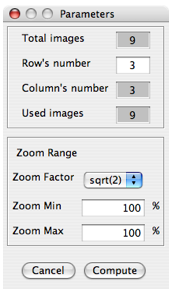
image
Fig. 1: User interface for the plug- in preparation
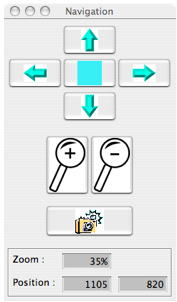
image
Fig. 2: User interface for the navigation in the mosaic
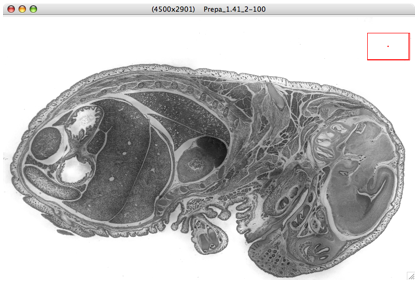
image
Fig. 3: Example of use plugin navigation

The algorithms below are ready to be downloaded. Biomedical Imaging Group. EPFL

Available Algorithms

http://bigwww.epfl.ch/algorithms.html

http://www.google.com/codesearch/p?hl=fr&sa=N&cd=4&ct=rc#M0QGbzpICpo/kybic/thesis/&q=MRI%20mesh%20matlab
The algorithms below are ready to be downloaded. They are generally written in JAVA or in ANSI-C, either by students or by the members of the Biomedical Imaging Group.Please contact the author of the algorithms if you have a specific question.

JAVA: Plug-ins for ImageJ
JAVA classes are usually meant to be integrated into the public-domain software ImageJ.
bullet Drop Shape Analysis. New method based on B-spline snakes (active contours) for measuring high-accuracy contact angles of sessile drops.
bullet Extended Depth of Focus. The extended depth of focus is a image-processing method to obtain in focus microscopic images of 3D objects and organisms. We freely provide a software as a plugin of ImageJ to produce this in-focus image and the corresponding height map of z-stack images.
bullet Fractional spline wavelet transform. This JAVA package computes the fractional spline wavelet transform of a signal or an image and its inverse.
bullet Image Differentials. This JAVA class for ImageJ implements 6 operations based on the spatial differentiation of an image. It computes the pixel-wise gradient, Laplacian, and Hessian. The class exports public methods for horizontal and vertical gradient and Hessian operations (for those programmers who wish to use them in their own code).
bullet MosaicJ. This JAVA class for ImageJ performs the assembly of a mosaic of overlapping individual images, or tiles. It provides a semi-automated solution where the initial rough positioning of the tiles must be performed by the user, and where the final delicate adjustments are performed by the plugin.
bullet NeuronJ. This Java class for ImageJ was developed to facilitate the tracing and quantification of neurites in two-dimensional (2D) fluorescence microscopy images. The tracing is done interactively based on the specification of end points; the optimal path is determined on the fly from the optimization of a cost function using Dijkstra's shortest-path algorithm. The procedure also takes advantage of an improved ridge detector implemented by means of a steerable filterbank.
bullet PixFRET. The ImageJ plug-in PixFRET allows to visualize the FRET between two partners in a cell or in a cell population by computing pixel by pixel the images of a sample acquired in three channels.
bullet Point Picker. This JAVA class for ImageJ allows the user to pick some points in an image and to save the list of pixel coordinates as a text file. It is also possible to read back the text file so as to restore the display of the coordinates.
bullet Resize. This ImageJ plugin changes the size of an image to any dimension using either interpolation, or least-squares approximation.
bullet SheppLogan. The purpose of this ImageJ plugin is to generate sampled versions of the Shepp-Logan phantom. Their size can be tuned.
bullet Snakuscule. The purpose of this ImageJ plugin is to detect circular bright blobs in images and to quantify them. It allows one to keep record of their location and size.
bullet SpotTracker Single particle tracking over noisy images sequence. SpotTracker is a robust and fast computational procedure for tracking fluorescent markers in time-lapse microscopy. The algorithm is optimized for finding the time-trajectory of single particles in very noisy image sequences. The optimal trajectory of the particle is extracted by applying a dynamic programming optimization procedure.
bullet StackReg. This JAVA class for ImageJ performs the recursive registration (alignment) of a stack of images, so that each slice acts as template for the next one. This plugin requires that TurboReg is installed.
bullet Steerable feature detectors. This ImageJ plugin implements a series of optimized contour and ridge detectors. The filters are steerable and are based on the optimization of a Canny-like criterion. They have a better orientation selectivity than the classical gradient or Hessian-based detectors.
bullet TurboReg. This JAVA class for ImageJ performs the registration (alignment) of two images. The registration criterion is least-squares. The geometric deformation model can be translational, conformal, affine, and bilinear.
bullet UnwarpJ. This JAVA class for ImageJ performs the elastic registration (alignment) of two images. The registration criterion includes a vector-spline regularization term to constrain the deformation to be physically realistic. The deformation model is made of cubic splines, which ensures smoothness and versatility.
ANSI C
Most often, the ANSI-C pieces of code are not a complete program, but rather an element in a library of routines.
bullet Affine transformation. This ANSI-C routine performs an affine transformation on an image or a volume. It proceeds by resampling a continuous spline model.
bullet Registration. This ANSI-C routine performs the registration (alignment) of two images or two volumes. The criterion is least-squares. The geometric deformation model can be translational, rotational, and affine.
bullet Shifted linear interpolation. This ANSI-C program illustrates how to perform shifted linear interpolation.
bullet Spline interpolation. This ANSI-C program illustrates how to perform spline interpolation, including the computation of the so-called spline coefficients.
bullet Spline pyramids. This software package implements the basic REDUCE and EXPAND operators for the reduction and enlargement of signals and images by factors of two based on polynomial spline representation of the signal.
Others
bullet E-splines. A Mathematica package is made available for the symbolic computation of exponential spline related quantities: B-splines, Gram sequence, Green function, and localization filter.
bullet Fractional spline wavelet transform. A MATLAB package is available for computing the fractional spline wavelet transform of a signal or an image and its inverse.
bullet Fractional spline and fractals. A MATLAB package is available for computing the fractional smoothing spline estimator of a signal and for generating fBms (fractional Brownian motion). This spline estimator provides the minimum mean squares error reconstruction of a fBm (or 1/f-type signal) corrupted by additive noise.
bullet Hex-splines : a novel spline family for hexagonal lattices. A Maple 7.0 worksheet is available for obtaining the analytical formula of any hex-spline (any order, regular, non-regular, derivatives, and so on).
bullet MLTL deconvolution : This Matlab package implements the MultiLevel Thresholded Landweber (MLTL) algorithm, an accelerated version of the TL algorithm that was specifically developped for deconvolution problems with a wavelet-domain regularization.
bullet OWT SURE-LET Denoising : This Matlab package implements the interscale orthonormal wavelet thresholding algorithm based on the SURE-LET (Stein's Unbiased Risk Estimate/Linear Expansion of Thresholds) principle.
bullet WSPM : Wavelet-based statistical parametric mapping, a toolbox for SPM that incorporates powerful wavelet processing and spatial domain statistical testing for the analysis of fMRI data.

FreeSurfer is a set of automated tools for reconstruction of the brain’s cortical surface from structural MRI data, and overlay of functional MRI data onto the reconstructed surface.

FreeSurfer is a set of automated tools for reconstruction of the brain’s cortical surface from structural MRI data, and overlay of functional MRI data onto the reconstructed surface.

http://surfer.nmr.mgh.harvard.edu/

FreeSurfer is brought to you by the Athinoula A. Martinos Center for Biomedical Imaging. Support for this research was provided in part by the National Center for Research Resources (P41-RR14075, R01 RR16594-01A1 and the NCRR BIRN Morphometric Project BIRN002, U24 RR021382), the National Institute for Neurological Disorders and Stroke (R01 NS052585-01), the National Institute of Biomedical Imaging and Bioengineering, as well as the Mental Illness and Neuroscience Discovery (MIND) Institute and is part of the National Alliance for Medical Image Computing (NA-MIC) funded by the National Institutes of Health through the NIH Roadmap for Medical Research, Grant U54 EB005149.

---

http://www.google.com/codesearch/p?hl=fr&sa=N&cd=1&ct=rc#voO8-N1ttR0/mesh_freesurfer2emse.m&q=MRI%20mesh%20matlab

---

FreeSurfer Beginners Guide


http://surfer.nmr.mgh.harvard.edu/fswiki/FreeSurferBeginnersGuide

FreeSurfer is a freely available software package developed by investigators at the Athinoula A. Martinos Center for Biomedical Imaging used for a number of procedures including:
  1. Creation of computerized models of the brain from magnetic resonance imaging (MRI) data. link
  2. Processing of functional magnetic resonance imaging (fMRI) data. link
  3. Measuring a number of morphometric properties of the brain including cortical thickness and regional volumes. link
  4. Intersubject averaging of structural and functional data using a procedure that aligns individuals based on their cortical folding patterns for optimal alignment of homologous neural regions. link

Machine Requirements

To run FreeSurfer, you will need either a PC running Linux or a Macintosh running OS X.

FreeSurfer consumes a lot of processor time, memory resources and disk space, so it is recommended to run FreeSurfer on as powerful a machine as you have available. For example, at MGH we typically run Linux CentOS 4 on 2.5GHz dual processor AMD Opterons with 4 to 8 GB of DDR SDRAM, and 250GB of disk space.

----------

The FreeSurfer tools deal with two main types of data: volumetric data (volumes of voxels) and surface data (polygons that tile a surface). The talks and tutorials should familiarize you with FreeSurfer's volume and surface processing streams, the recommended workflow to execute these, and many of their component tools. The tutorials also describe some of FreeSurfer's tools for registering volumetric datasets, performing group analysis on morphology data, and integrating multi-modal output with FreeSurfer (overlaying color coded parametric maps onto the cortical surface and visualizing plotted results). After completing the tutorials, you should be able to:
  • perform surface reconstructions;
  • generate subcortical segmentations;
  • fix errors encountered during the volume or surface processing;
  • overlay functional data onto surfaces;
  • perform group analysis of structural (e.g. thickness) and functional data.

code; matlab; mesh; Source Signal Imaging, developers of EMSE Suite. EMSE Suite is a Windows-based software toolkit for 4D multimodal functional brain imaging

http://www.google.com/codesearch/p?hl=fr&sa=N&cd=1&ct=rc#voO8-N1ttR0/mesh_freesurfer2emse.m&q=MRI%20mesh%20matlab

http://www.sourcesignal.com/

Welcome to Source Signal Imaging, developers of EMSE Suite. EMSE Suite is a Windows-based software toolkit for 4D multimodal functional brain imaging, including analysis, source estimation, image processing, and visualization. MEG/EEG and MRI/fMRI datasets from many vendors and standard formats may be combined to obtain results not available from independent analyses of the separate modalities. First introduced in 1996, and now used by clinicians and researchers worldwide, EMSE Suite has a modular architecture, rich feature set and relatively low cost. Click on the menu to the left to find information about our products, news of upcoming events, links to other sites of interest, as well as access to original publications.


EMSE 5.3 Release Candidate 3 is here
6.22.09 We have added many new features and improvements

Thursday, October 8, 2009

FEM, finite element method, PDE, partial differential equation;mathematica

http://library.wolfram.com/infocenter/MathSource/4478/
This package allows to solve second order elliptic differential equations in two variables:

div(a*grad u) - b*u = f in the domain domain u = gD Dirichlet boundary conditions on first part of boundary a*du/dn = gN Neumann condition on the other part of the boundary

If the functions a, b f, gD and gN are given, then a numerical approximation is computed, using the method of finite elements. To generate meshes the programm EasyMesh can be used.

a general finite element environment;mathematica

http://library.wolfram.com/infocenter/TechNotes/6635/

The Mathematica application package AceFEM is a general finite element environment designed to solve multi-physics and multi-field problems. Using Mathematica, the program provides both extensive symbolic capabilities and the numeric efficiency of a commercial finite element environment.

AceFEM consists of two components. The main module performs tasks such as processing user-input data, mesh generation, control of solution procedures, and graphic post-processing of results. A fully integrated second module handles numerically intensive operations such as evaluation and assembly of finite element quantities, solution of linear systems of equations, contact search procedures, and more.

MESH GENERATION;mathematica

http://library.wolfram.com/infocenter/Conferences/5771/

The upcoming release of Mathematica (2005) establishes the next level of sophistication in scientific function and data visualization. All the plotting functions have been rewritten to incorporate state-of-the-art algorithms in numeric and algebraic analysis, mesh generation, and computational geometry. Arbitrary-precision function evaluation, region, mesh overlays, piecewise functions, and singularities handling are just part of the new functionality. All of this makes Mathematica a unique system for function and data visualization with features not found in any other algebraic computational system. In this presentation we will give a general description and present several examples of the new capabilities.

mesh generation, literate programming, matlab; mathematica; persson

http://library.wolfram.com/infocenter/MathSource/5475/

This Mathematica notebook is an effort to transcribe the MATLAB code of a 2-D mesh generation algorithm as described explicitly in Persson and Strang's paper [1]. The goal is to make the algorithm executable in Mathematica so that its users can also experiment with the algorithm.

Since the algorithm was expressed very clearly from their original paper [1] including the MATLAB code, which is a perfect example of literate programming in MATLAB, it is pretty easy to translate the MATLAB code "literally" into Mathematica. Such translation is virtually always possible in either direction even without human interference. And such a Rosetta Stone kind of translation might be useful if one species of people coding in either MATLAB or Mathematica were to disappear, future generations would still be able to rediscover one programming language by reading its interpretation in the other one.

However, it is so tempting to present the literate programming capability of Mathematica by following its general principles; that is, (a) documentation mingles with code and both get pretty-printed; (b) shuffle code pieces for human readability. I decided to transcribe the code manually.

The original MATLAB code was documented as 8 steps (sections) in sequential order, which is easy to follow because the ideas behind the code were explained beforehand in early parts of the paper. So it is recommended that you read part 1 and 2 of the original paper. Instead of following the MATLAB code literally in 8 steps, this notebook breaks the code pieces apart and examines each of them separately.